
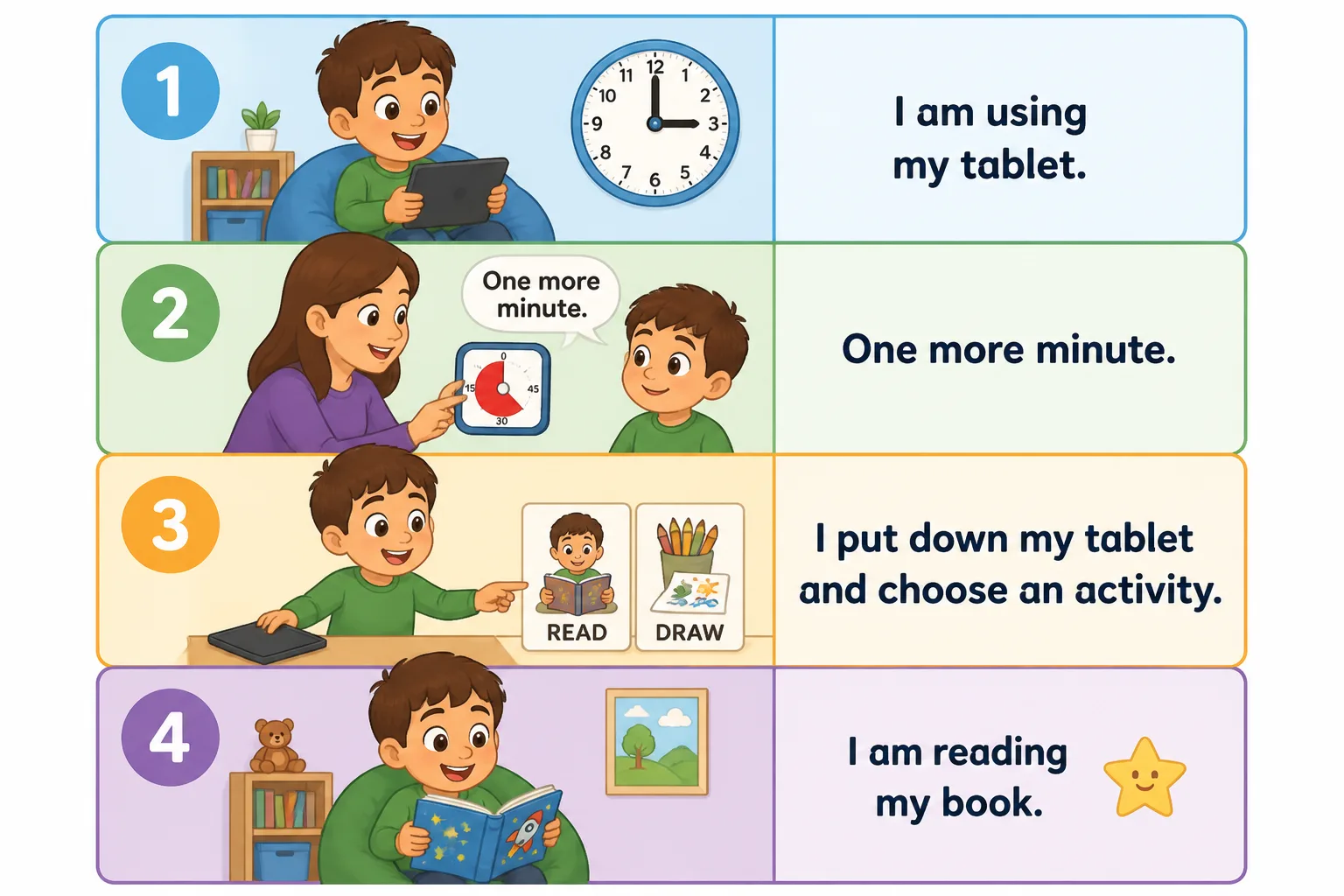

Transitioning from screen time to another activity can be challenging for many young children, including those with autism or sensory and communication needs. This routine helps children understand what to expect, reduces anxiety, and supports a smoother change from a preferred activity like tablet use to a different task or play. In this article, we will explore why this transition can be difficult, signs parents might notice, and practical strategies to prepare and support your child effectively.
Why Transitioning from Screen Time Can Be Difficult
Screen time is often a highly preferred activity for children because it is engaging, interactive, and provides immediate feedback. Stopping this activity can cause frustration, anxiety, or resistance, especially if the child is deeply focused or using the screen for sensory regulation. Additionally, the sudden change can be overwhelming due to:
- Uncertainty: Not knowing what comes next can increase stress.
- Processing time: Children may need extra time to shift attention.
- Communication challenges: Difficulty expressing feelings or needs.
- Sensory needs: Screen time might help regulate sensory input, so stopping can feel uncomfortable.
Signs You Might Notice When Your Child Struggles with This Transition
Some common signs include:
- Resistance to stopping screen use, such as grabbing the device or saying “No!”
- Increased anxiety or agitation, like pacing, whining, or crying
- Difficulty following verbal instructions alone
- Seeking sensory input or comfort objects more intensely
Preparing Your Child Before the Transition
Preparation is key to easing transitions. Here are some helpful steps:
- Give advance notice: Tell your child what will happen next, e.g., “In five minutes, we will stop the tablet and read a book.”
- Use visual timers or countdowns: Visual timers help children see how much time is left, supporting predictability.
- Offer choices: Let your child choose between two activities after screen time, increasing their sense of control.
- Use simple, clear language: Short phrases like “One more minute,” “All done,” or “Show me when ready” help comprehension.
Step-by-Step Strategies for a Smooth Transition
- Set a clear time limit with a visual timer: Start by showing the timer and explaining how much time is left on the screen.
- Give a verbal warning: Use phrases like “One more minute” or “Five minutes until screen time ends.”
- Use a First → Then approach: For example, “First tablet, then reading.” This helps clarify expectations.
- Offer a transition object or activity: Provide a preferred toy, book, or sensory item to help shift focus.
- Use visual supports: Show a picture schedule or sequence cards illustrating the steps.
- Encourage communication: Support your child to express feelings or ask for more time using speech, AAC, gestures, or signs.
What Adults Can Say During the Transition
Use calm, supportive language such as:
- “In two minutes, we will stop the tablet and choose a new activity.”
- “You can say ‘I need more time’ if you want.”
- “Let’s put the tablet away together.”
- “Which activity would you like next? Reading or drawing?”
- “You’re doing great. I’m here to help.”
Handling Difficult Moments
If your child becomes upset or resistant, try to:
- Stay calm and patient, avoiding punishment or rushing.
- Offer a break or sensory support if needed (e.g., a quiet corner, weighted blanket).
- Use simple reassurance: “I see you’re upset. It’s okay. We will try again soon.”
- Allow extra processing time before repeating the transition steps.
Practicing the Routine During Calm Times
Practice the transition when your child is relaxed, such as after a meal or during a quiet time. Use the visual schedule and countdowns consistently to build familiarity and confidence.
Environmental Adjustments to Support Transition
Consider reducing sensory distractions in the next activity area, keeping the environment calm and inviting. Keep transition objects or visual supports easily accessible.
Building Independence Gradually
Encourage your child to participate in the transition by:
- Helping set the timer
- Choosing the next activity
- Putting away the tablet
- Using communication tools to express readiness or needs
What to Avoid
- Sudden, unexpected stopping without warning
- Yelling, threats, or punishment for resistance
- Forcing eye contact or speech
- Rushing the child without processing time
Individual Differences and When to Seek Professional Support
Every child is unique. Some may need more sensory support, others more communication aids. If transitions consistently cause significant distress or interfere with daily life, consider consulting a speech therapist, occupational therapist, or behavioral specialist for tailored strategies.
Key Takeaway
Predictability, preparation, clear communication, and respect for your child’s needs are essential to support smooth transitions from screen time to other activities. Using visual supports and gradual steps can reduce anxiety and build independence over time.
What strategies have you found helpful when your child needs to stop screen time and switch activities?
For related routines, you might also find helpful our Transition from Playground to Home and Transition from Bath to Bedtime visual routines.
Download the images in this article